In this blog post, I will explain and provide source code to automatically draw the powerset of a set using Java and GraphViz. Drawing a powerset is useful in mathematics and also in computer science, for example in frequent itemset mining, it can be used to visualize relationships between itemsets.
What is the powerset of a set?
It can be simply defined as a set and all its subsets.
For example, the powerset of the set {1,2,3} is the set { {}, {1}, {2}, {3}, {1,2}, {1,3}, {2,3} {1,2,3}}. It can be easily demonstrated that the size of a powerset of a set containing n items is 2^n.
How can we draw a powerset?
A powerset is often represented as a Hasse Diagram. For the purpose of drawing powersets, a Hasse Diagram can be defined as a diagram where:
- each vertex is a set from the powerset
- there is an edge from a set X to a set Y iff X ⊂ Y and there does not exist a set Z such that X ⊂ Z ⊂ Y
For example, the Hasse diagram of the powerset of {1,2,3} is:
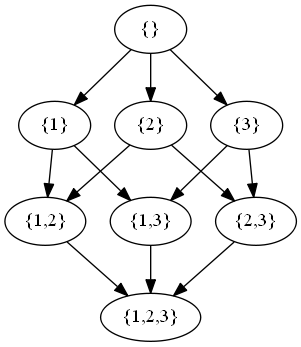
hasse diagram of powerset of {1,2,3}
Now, I will show how to draw a nice diagram automatically such as the one above.
Step 1. Generate a GraphViz input file
The first step is to have Java installed on your computer and use the following Java program to generate a GraphViz input file named “input.dot” for the powerset of {a,b,c,d,e}. Note that you can edit the line String[] set = new String[] { “a”, “b”, “c”, “d”, “e” } to draw the powerset of another set. Note also that the Java code below is not fully optimized. But for the purpose of drawing powersets, it is ok.
import java.io.BufferedWriter;
import java.io.FileWriter;
import java.io.IOException;
import java.util.ArrayList;
import java.util.Collections;
import java.util.List;

/**
 * @author Philippe Fournier-Viger, 2014
 */
public class DrawPowerSet {

	public static void main(String[] arg) throws IOException,
			InterruptedException {

		// This is the set of integers that we want to draw the powerset of
		String[] set = new String[] { "a", "b", "c", "d", "e" };

		// output file
		String output = "input.dot";

		// create the file
		BufferedWriter writer = new BufferedWriter(new FileWriter(output));
		writer.write("digraph mygraph{");

		// We will enumerate all the subset
		for (long i = 0, max = 1 << set.length; i < max; i++) {
			// we create a new subset
			List newSet = new ArrayList();
			for (int j = 0; j < set.length; j++) {
				// check if the j bit is set to 1
				int isSet = (int) i & (1 << j); 				if (isSet > 0) {
					// if yes, add it to the set
					newSet.add(set[j]);
				}
			}
			// For the new subset, print links to all supersets
			if (newSet.size() != set.length) {
				printLinksToImmediateSupersets(newSet, set, writer);
			}
		}
		// write end of file
		writer.write("}");
		writer.close();
	}

	/**
	 * This method print links from a subset to all its immediate supersets (not
	 * optimized).
	 *
	 * @param subset
	 *            the subset
	 * @param set
	 *            the set of all integers
	 * @param writer
	 *            object to write to the output file
	 * @throws IOException
	 */
	private static void printLinksToImmediateSupersets(List subset,
			String[] set, BufferedWriter writer) throws IOException {
		// For each integer in the set of all integers
		for (int i = 0; i < set.length; i++) {
			String value = set[i];
			// if it is not contained in the subset
			if (subset.contains(value) == false) {
				// we add it to the set to make an immediate superset
				// and write the link
				List newSet = new ArrayList();
				newSet.addAll(subset);
				newSet.add(value);
				writer.write(asString(subset) + " -> " + asString(newSet)
						+ " \n");
			}
		}
	}

	/**
	 * Convert a set to a string representation
	 *
	 * @param set
	 *            the set as a list of integers
	 * @return a string
	 */
	private static String asString(List set) {
		Collections.sort(set);
		// if the empty set, we will write "{}"
		if (set.size() == 0) {
			return "\"{}\"";
		}
		// otherwise we will write the set of integers
		StringBuffer buffer = new StringBuffer();
		buffer.append("\"{");
		// for each integer
		for (int i = 0; i < set.size(); i++) {
			String value = set.get(i);
			buffer.append(value);
			if (i != set.size() - 1) {
				buffer.append(",");
			}
		}
		buffer.append("}\"");
		return buffer.toString();
	}

}
By running the above program, it will create a file called input.dot containing a content similar to this, which represents the nodes of the graph that will be drawn and the links between nodes.
digraph mygraph{"{}" -> "{a}"
"{}" -> "{b}"
"{}" -> "{c}"
"{}" -> "{d}"
"{}" -> "{e}"
"{a}" -> "{a,b}"
"{a}" -> "{a,c}"

....

"{c,d,e}" -> "{a,c,d,e}"
"{c,d,e}" -> "{b,c,d,e}"
"{a,c,d,e}" -> "{a,b,c,d,e}"
"{b,c,d,e}" -> "{a,b,c,d,e}"
}
Step 2. Generating a PNG file of the graph using GraphViz
Then, we can run GraphViz from the command line to generate the graph as a PNG file:
dot -Tpng input.dot > output.png"
This will generate a nice Hasse Diagram:
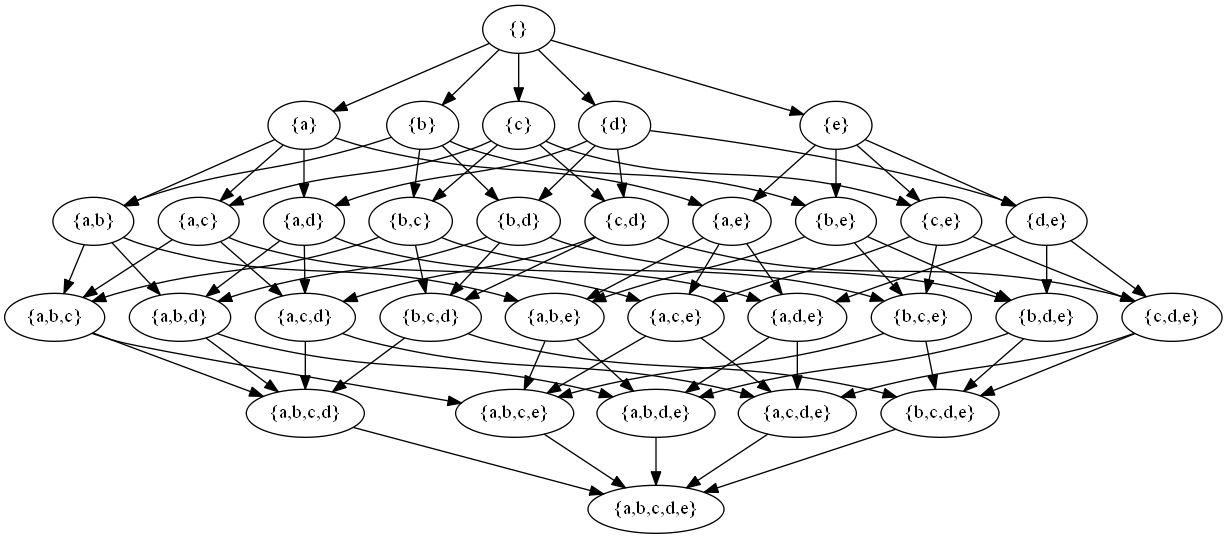
Hasse Diagram of the powerset of {a,b,c,d,e}
—
Hope that you have enjoyed this post. If you like this blog, you can tweet about it and/or subscribe to my twitter account @philfv to get notified about new posts.
Philippe Fournier-Viger is an assistant professor in Computer Science and also the founder of the open-source data mining software SPMF, offering more than 52 data mining algorithms.