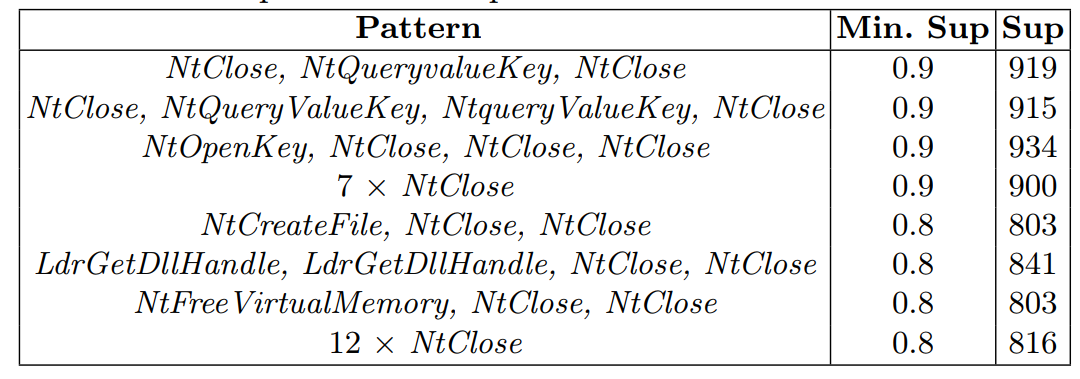
Today, some people contacted me on LinkedIn to ask me if I have any papers where I could sell the authorship. I was quite amazed that someone would ask me that… But I have heard that it is something that is happening nowadays in Academia. Of course, I would never sell or buy authorship. This is something that is unethical and very bad for academia.
Here is a screenshot:
I would not disclose the name of the person. But there are some people like that on LinkedIn, trying to earn money in that way…
This was just a short blog post to talk about this briefly.
This is the third of a series of blog posts about the architecture of the SPMF data mining library. Today, I will explain the role of another an internal module in SPMF, called the Preference Manager. This module is used to store the preferences of the user so that every time that a user utilizes SPMF his preferences will be saved for the next time.
The Architecture of SPMF
Before going into details, let’s have a look at the overall architecture of SPMF, depicted in the picture below.
SPMF is basically a Java program that provides a graphical user interface as well as a command line user interface for the user. These two interfaces are used to call algorithms offered by SPMF, which are of three types: (1) data preprocessing algorithms and tools, (2) data mining algorithms, and (3) visualizations. There is also a module called the Algorithm Manager, which takes care of managing all algorithms offered in SPMF, and another module called the Command Processor which is called by the graphical or command line interface to run the algorithms. These modules have been discussed in the previous posts about the architecture of SPMF (links above).
Today, I will talk about the Preference Manager. It is a module that is designed to save information about the user preferences.
What kind of user preferences are saved by SPMF?
Here is a list of some user preferences that are saved by SPMF:
The last directory that has been used for reading an input file.
The last directory that has been used to save an output file.
The last directory that has been used to save results from an experiment.
The user prefers to run algorithms using a separated process from the graphical user interface or not
The user prefers to open output files using the SPMF text editor or using the system’s text editor.
The font size and other preferences set by the user for the SPMF text editor.
etc.
Where are all these preferences saved?
The Preference Manager save the user preferences on the local computer through the Java.util.prefs package. If you are using Windows, it means that the preferences from SPMF will be saved in the Windows Registry.
How is the Preference Manager working?
The Preference manager has several methods. The main method is called getInstance(). It is a static method that allows to access the instance of the Preference Manager to then be able to call its other methods.
The Preference Manager has several methods for reading and saving various user preferences. These methods have names that start with set and get, respectively. For example, to read and write the user preference for the input file directory, there are two methods in the Preference Manager called setInputFilePath() and getInputFilePath(). There are other similar methods for the other preferences.
Here is thus a visual representation of the class Preference Manager with its methods:
If the method getInputFilePath() is called on a Windows computer, the Preference Manager will read the values in the Windows Registry for a key “ca.pfv.spmf.gui.input”. If this key does not exist, the value null will be returned.
For example, if I check in the Registry Editor of Windows (regedit) on my computer, I can see that all preferences of SPMF are stored here in the registry:
The exact location in the Registry may vary on different computers.
If you look at the code of the Preference Manager, you will see the definitions for all these registry keys.
And if you want to see the code of the methods to read and write the user preferences about the input file in the Preference Manager, here it is:
As you can see, the Preference Manager class is very simple! It is simply designed to read and write various user preferences to different locations. But nevertheless, the Preference Manager plays an important role in the software. This is why I wanted to talk about that today.
Conclusion
Today, I have explained the role of the Preference Manager, a simple but important module in SPMF. Hope that this has been interesting. Next time, I will explain more about the architecture of SPMF.
== Philippe Fournier-Viger is a distinguished professor and the founder of the open-source data mining software SPMF, offering more than 250 data mining algorithms.
Pattern mining is a popular research area in data mining, which aims at discovering interesting and useful patterns in data. It is a field of research that has been active for over 25 years and there is a lot of technical terms related to this field. Thus, in this blog post, I will provide a short glossary of key terms found in pattern mining papers.
Antecedent: The left side of an association rule.
Apriori Algorithm:Apriori is a frequent itemset mining algorithm used to identify frequent itemsets in a dataset. It is the first algorithm for that task.
Association Rule: A rule that expresses the dependence between two itemsets.
Association Rule Mining: A technique for discovering associations and relationships between items in a dataset
Closed Episode: An episode that is not a proper subset of any other episode.
Closed Frequent Itemsets: A set of itemsets that are frequent and contain no supersets that are also frequent.
Closed Sequential Patterns: A set of sequences of items that are frequent and contain no supersets that are also frequent.
Consequent: The right side of an association rule
Eclat Algorithm: A frequent itemset mining algorithm used to identify frequent itemsets in a dataset.
Episode: A collection of one or more items or events that appear in a sequence.
Episode Rule: A rule that expresses the dependence between two episodes, or between events.
Episode Rule Mining: A process of discovering patterns of relationships between events in a sequence, which have the form of rules.
Episode Mining: The process of discovering patterns that appear in a single long sequence of events with timestamps
Frequent Episode: An episode that appears in a dataset with a support greater than a given threshold.
Frequent Itemset: An itemset (set of items) that appears in a dataset with a support greater than a given threshold.
FP-Growth Algorithm: A frequent itemset mining algorithm used to identify frequent itemsets in a dataset.
GSP Algorithm: A sequential pattern mining algorithm used to identify frequent patterns in a sequence of items. It is the first algorithm for that problem.
Graph Database: A database that stores data in the form of graphs (multiple graphs).
Graph Mining: The process of discovering patterns, trends, and relationships in graphs.
High-Utility Sequential Patterns: A set of sequences of items with a high total profit associated with them.
Itemset Mining: The process of discovering patterns and relationships between items in a dataset.
Itemset: A collection of one or more items that appear in a sequence.
Lift: A measure of the strength of an association rule.
Minimum Support: A parameter used to specify the minimum number of occurrences of an itemset or pattern for it to be considered frequent.
Minimum Confidence: A parameter used to specify the minimum confidence of an association rule for it to be considered valid.
Maximal Episode: An episode that is as long as possible in a sequence.
Maximal Frequent Itemsets: A set of itemsets that are frequent and contain no subsets that are also frequent.
Maximum Gap: A parameter used to specify the maximum gap between two items in a sequence for it to be considered a valid pattern.
Maximum Length: A parameter used to specify the maximum length of a pattern for it to be considered valid.
Maximal Sequential Patterns: A set of sequences of items that are frequent and contain no subsets that are also frequent.
Maximum Window Size: A parameter used to specify the maximum size of a sliding window for it to be used for pattern mining.
Periodicity Constraint: A parameter used to specify the minimum periodicity of an itemset or pattern for it to be considered frequent.
Periodic Itemsets: A set of itemsets that occur frequently and have a consistent period of occurrence.
Periodic Pattern Mining: The process of finding patterns that are regularly appearing over time in a sequence of events. This can be done using algorithms such as PFPM.
Periodic Sequential Patterns: A set of sequences of items that occur frequently and have a consistent period of occurrence.
Prefix Span Algorithm: A sequential pattern mining algorithm used to identify frequent patterns in a sequence of items. It is an important algorithm but faster algorithms have been developed such as CM-SPAM and CM-SPADE (2014), and others.
Prefix-tree: A tree-like data structure used by algorithms such as FP-Growth to store information. The information can be transactions, itemsets or other information.
Sequence Database: A collection of sequences that can be used for sequence rule mining.
Sequential Patterns: A set of sequences of items that occur frequently in a dataset.
Sequential Pattern Mining: The process of discovering patterns and relationships between sequences of items.
Sequential Rule Mining: The task of finding relationships between events or symbols in sequences that have the form of rules.
Subgraph: A graph that is part of another graph.
Subgraph Mining: The process of finding subgraphs that are interesting in a single graph or a graph database.
Subsequence: A subset of a sequence that appears in the same order.
Supersequence: A sequence that contains all the elements of a sequence.
Support: A measure of how often an itemset appears in a dataset.
Temporal Sequence Mining: A process of discovering patterns in time-stamped sequences.
Time-Gap Constraint: A parameter used to limit the maximum gap between two items in a sequence for it to be considered a valid pattern.
Window Constraint: A parameter used to limit the size of a sliding window used to identify sequential patterns.
In this blog post, I will continue explaining the architecture of the SPMF data mining library. In the previous post, I have introduced a key component of SPMF called the Algorithm Manager, which manages all the algorithms offered in SPMF.
Today, I will move on to talk about two other key components in the architecture of SPMF. In particular, I will focus on how SPMF can be run from both a graphical interface and a command line interface. How does these two interfaces can work seamlessly with the rest of the code in SPMF? The short answer is that it is thanks to two modules called the Main class and the Command Processor, that I will explain in this article. Briefly, the Main class is the entry point for running SPMF, which detects whether SPMF is started from the command line or not, and then launches the graphical interface or the command line interface. And the Command Processor is the module that take care of running a command (e.g. executing a data mining algorithm or launching a visualization). A command is either launched by the command line or graphical interface.
A brief overview of SPMF’s architecture
Before explaining this in details, let’s briefly review the overall architecture of SPMF.
SPMF is a Java software, and it is distributed as a JAR file, as most software implemented in Java:
SPMF is designed to be used in three ways:
as a Java library that can be imported in other Java project
as a standalone program with a simple graphical user interface
as a standalone program that can be run from the command line
The architecture of SPMF is presented in the figure below:
As can be seen in the top of this figure, the SPMF software can be called by other Java software or by the user using the library API, graphical interface or command line interface. Then, all these interfaces rely on a class called the Algorithm Manager to obtain information about the available algorithms and how to run them. There are three types of algorithms: (1) preprocessing algorithms and tools, (2) data mining algorithms and (3) visualizations.
The Main Class
Now let’s get into details. As I said previously, the SPMF software is packaged and distributed as a JAR file. To make a Jar file that can be executed as a program, it is necessary to choose a Main class that will be the entry point for the program.The Main class play this role. It is located in the package ca.pfv.spmf.gui of SPMF.
When the user launches SPMF program from the command line or by double-clicking on the JAR file to start the graphical user interface, the method main() of the class Main is called.
Here is the code of the main() method:
Briefly, the method checks if some arguments have been passed to the program. If there aresome arguments, it means that SPMF is executed from the command line. Thus, the method processCommandLineArguments(args) is called to execute the command that is received from the command line. Otherwise, if there is no argument, it means that the user wants to launch the graphical interface. In that case, the main window of SPMF is created which is called MainWindow in the current version of SPMF and it is displayed to the user.
This is the MainWindow:
The Command Processor
Another important module in SPMF is the Command Processor. It is a class that is shared by both the command line interface and graphical user interface. The Command Processor is used to run algorithms that the user has selected either from the command line or graphical user interface.
Everytime that the user calls an algorithm from either the command line or graphical interface, the method runAlgorithm() of the Command Processor is called as illustrated below:
The runAlgorithm() method of the command processor takes as parameters: (1) an algorithm name, (2) a path to an input file (or null), (3) a path to an output file (or null), and (4) an array of parameters to be passed to the algorithm. Here is the declaration of this method:
What does the Command Processor do when the runAlgorithm() method is called? It does the following:
First, the Command Processor calls the method getDescriptionOfAlgorithm() of the Algorithm Manager to obtain information about the algorithm that the user wants to run, as illustrated below.
After obtaining information about the algorithm, the Command Processor compares this information to the parameters provided by the user. If the algorithm does not exist in SPMF, if the input or output file path are incorrect, or if the parameters provided by the user do not match the description of the algorithm, an error is thrown. This error will be displayed to the user either through the graphical or command line interface.
After that, the Command Processor will run the algorithm() by calling the algorithm based on its description. The description of an algorithm is a subclass of the class DescriptionOfAlgorithm and must have a runAlgorithm() method. The Command Processor call this method to run the algorithm. This is illustrated below:
So until now, I have explained the main idea about the Main class and the Command Processor. Now, I will explain a bit more details.
The Command Processor can also automatically convert some file format
Another feature of the Command Processor is that it can automatically convert some special file formats to the SPMF format so that SPMF algorithms can be run on other file formats and that it is totally transparent to the user, and that algorithms dont need to be modified to support other formats.
This is achieved as follow. If the Command Processor is called with a special file type such as files having the extensions .ARFF or .TEXT files, then the Command Processor will call some tools to convert these files to the SPMF format. This will produce some temporary file. Then the Command Processor will call the requested algorithm on this temporary file. And finally, the Command Processor will delete the temporary file, and convert the output of the algorithm back to the format requested by the user. I might explain this in more details in a future blog post.
A more accurate picture of SPMF’s architecture
So after what I have explained today, we can get a more clear picture of the architecture of SPMF as follows, where I have added the Main class and the Command Processor:
SPMF version number
By the way, the Main class is also where the version number of SPMF is stored in the code:
Conclusion
In this blog post, I have explained more about the architecture of SPMF. In particular, I have described the role of the Main class and the Command Processor, which are key to run SPMF both from a command line interface and graphical interface.
Hope that it has been interesting. If so, please leave some comments below 🙂
== Philippe Fournier-Viger is a distinguished professor and the founder of the open-source data mining software SPMF, offering more than 250 data mining algorithms.
In this new series of blog posts, I will talk about the architecture of the SPMF data mining library, and in particular, I will talk about the AlgorithmManager, which is a key component of SPMF, which manages all the algorithms that are provided in SPMF. I will talk about the key idea behind this module and why it is designed the way it is.
But first, let’s have a look at the overall architecture of SPMF. A picture of the architecture is given below.
Basically, SPMF is a library of algorithms, and there are three types of algorithms: (1) algorithms for preprocessing data, (2) data mining algorithms, and (3) algorithms to visualize data or the output of algorithms, as shown by those three boxes:
The Algorithm Manager is a key module from SPMF that manages the list of all available algorithms offered in SPMF. In particular, it provides the list of all algorithms to the user interface and command line interface of SPMF.
The three main methods (functions) of the Algorithm Manager are illustrated below:
To access the algorithm manager from the Java code, we must write. AlgorithmManager.getInstance() to obtain the instance of the Algorithm Manager. Then, we can call two key methods (functions) of the algorithm manager, which are:
getListOfAlgorithmsAsString(): returns the list of all algorithms that are offered in SPMF (as a list of strings),
getDescriptionOfAlgorithm(): returns the description of an algorithm that has a given name, which allows to know more about the algorithm and also to run the algorithm.
I will next show you some examples about how to use these two functions, while providing more explanations.
Example 1: Obtaining the list of all algorithms offered in SPMF
First, let me show you an example of how to use the AlgorithmManager to obtain the list of algorithms offered in SPMF. Here I wrote a small Java program:
import java.util.List;
import ca.pfv.spmf.algorithmmanager;
public class Example1{
public static void main(String[] args) throws Exception {
List<String> list = AlgorithmManager.getInstance().getListOfAlgorithmsAsString(true, true, true);
for(String name : list) {
System.out.println(name);
}
}
}
By running this program, the list of available algorithms from SPMF will be printed in the console like this:
If you look carefully at this output, you will notice that there are two types of elements in that list: (1) names of algorithms (e.g. “Apriori_association_rules”), and (2) names of categories of algorithms (starting with ” — “). For example, in the category ” — CLUSTERING — “, there are several clustering algorithms such as “BisectingKMeans”, “DBScan”, “Hierarchical_clustering” etc. The algorithms are classified into categories to make it easier for users to look for algorithms.
Another thing that you may notice in the above example, is that the method “getListOfAlgorithmsAsString()” has three Boolean parameters:
getListOfAlgorithmsAsString(true, true, true);
Why? Those Boolean parameters are filters. Setting them to true indicate that we want to list all algorithms from the three types of algorithms (the (1) preprocessing algorithms, (2) the data mining algorithms, and (3) the algorithms for visualizations). If we want to see only the data mining algorithms, we would change as follow:
getListOfAlgorithmsAsString(false, true, false);
Example 2: Obtaining information about a specific algorithm
Now, let me show you a second example, where I will explain how to obtain information about a specific algorithms from SPMF. Here is a simple Java program that calls the AlgorithmManager to get information about the “RuleGrowth” algorithm and print the information to the console:
The result of running this code is that information about the RuleGrowth algorithm is printed in the console:
Name : RuleGrowth
Category : SEQUENTIAL RULE MINING
Types of input file : [Database of instances, Sequence database, Simple sequence database]
Types of output file : [Patterns, Sequential rules, Frequent sequential rules]
Types of parameters : [[Minsup (%), (e.g. 0.5 or 50%), class java.lang.Double, isOptional = false ], [Minconf (%), (e.g. 0.6 or 60%), class java.lang.Double, isOptional = false ], [Max antecedent size, (e.g. 1 items), class java.lang.Integer, isOptional = true ], [Max consequent size, (e.g. 2 items), class java.lang.Integer, isOptional = true ]]
Implementation author : Philippe Fournier-Viger
URL: : http://www.philippe-fournier-viger.com/spmf/RuleGrowth.php
This output indicates the name of the algorithm, the category that it belongs to, its type of input file and output file, the type of parameters that it takes, who is the implementation author and an URL to the documentation of SPMF for that algorithm.
Now lets me explain in more details about how it works.
When we call the method algoManager.getDescriptionOfAlgorithm(“RuleGrowth“), the Algorithm Manager returns an object of type DescriptionOfAlgorithm. The class DescriptionOfAlgorithm is an abstract class designed to store information about any algorithm. Each algorithm in SPMF must have a subclass of DescriptionOfAlgorithm that provide information about the algorithm.
For example, for the RuleGrowth algorithm, there is a class DescriptionAlgoRuleGrowth that is a subclass of DescriptionOfAlgorithm, which provides information about the RuleGrowth algorithm. If you are curious, here is the code of that class:
Each subclass of DescriptionOfAlgorithm must implement a set of methods to provide information about the algorithm. Those methods are:
getName(): return the name of the algorithm (e.g. RuleGrowth)
getAlgorithmCategory(): return the category of the algorithm (e.g. SEQUENTIAL RULE MINING)
getURLOfDocumentation(): return an URL to a webpage describing this algorithm
runAlgorithm(): this method is used to call this algorithm (apply it)
getParameterDescription(): obtain information about all the parameters of the algorithm. This is provided as a list of object of type DescriptionOfParameter. Basically, for each parameter, we have a name, an example, the type of parameter (e.g. Double) and a Boolean indicating if the parameter is optional (e.g. true) or not.
getImplementationAuthorNames(): returns the name(s) of who implemented the algorithm
getInputFileTypes(): return the types of input files that this algorithm take as input. It is a list of String from the most general type to the most specific.
getOutputFileTypes():return the types of output files that this algorithm take as input. It is a list of String from the most general type to the most specific.
To summarize, here is an illustration of the relationship between the Algorithm Manager and the classes DescriptionOfAlgorithm and DescriptionOfParameter:
Example 3: Running an algorithm
Now let me show you how to use the algorithm manager to run an algorithm from SPMF. Lets look at the following example:
import ca.pfv.spmf.algorithmmanager;
public class Example3{
public static void main(String[] args) throws Exception {
AlgorithmManager algoManager = AlgorithmManager.getInstance();
DescriptionOfAlgorithm descriptionOfAlgorithm = algoManager.getDescriptionOfAlgorithm("PrefixSpan");
String[] parameters = new String[]{"0.4","50","true"};
String inputFile = "contextPrefixSpan.txt";
String outputFile = "./output.txt";
descriptionOfAlgorithm.runAlgorithm(parameters, inputFile, outputFile);
}
}
This Java program calls the function getDescriptionOfAlgorithm to first obtain the description of the PrefixSpan algorithm. Then, the program call the method runAlgorithm() of that description to execute the algorithm on a file called “contextPrefixSpan.txt” and save the result in a file “output.txt”. Note that to run this example, it is necessary that the file “contextPrefixSpan.txt” is located in the right location on your computer or that you give the full path to the file.
Any algorithms from SPMF can be called in a similar way through the AlgorithmManager.
More about the Algorithm Manager
Now that you know more about the AlgorithmManager and its purpose, let me explain a bit more about the internal design of the AlgorithmManager.
When I implemented this module, I wanted to avoid having a hard coded list of algorithms in the code to make the software easier to maintain. Thus, I have decided that each algorithm in SPMF would instead have a class that describes it, which is a subclass of DescriptionOfAlgorithm. For example, the RuleGrowth algorithm has a class DescriptionAlgoRuleGrowth to describe the RuleGrowth algorithm.
Now, internally, to avoid hard coding the list of all algorithms, the AlgorithmManager scans the package “ca.pfv.spmf.algorithmmanager.descriptions;” to automatically find all the subclasses of DescriptionOfAlgorithm. This allows to automatically find all algorithms that are available in SPMF and make the list of them. The AlgorithmManager can then give this list to the user interface of SPMF, etc.
Thus, if we want to add a new algorithm to SPMF, we just need to create a new subclass of DescriptionOfAlgorithm and put it in the package “ca.pfv.spmf.algorithmmanager.descriptions;” and the Algorithm Manager will automatically detect it, which is very convenient.
If you are curious, this detection is done by the following code in the AlgorithmManager class:
which calls this function:
The above function is somewhat complex because it has to work both when SPMF is called as JAR file or when it is called from the source code. I will not explain this code in more details.
Conclusion
In this blog post, I have given an overview of a key module in SPMF, which is the AlgorithmManager. In upcoming blog posts, I will explain other interesting aspects of the architecture of SPMF. Hope that this has been interesting.
== Philippe Fournier-Viger is a full professor and the founder of the open-source data mining software SPMF, offering more than 250data mining algorithms.
Let me first describe the requirements. It is important to have installed Visual Basic (VB) (for the .NET platform) and Java on your computer.
Second, you should download the spmf.jarfile from the SPMF website and put it in the same directory as your VB program.
Third, you should make sure that your Java installation is correct. In particular, you should be able to execute the java command from the command line of your computer. If you type “java -version” in the command line of your computer, you should see the version of Java:
If you see this, then it is OK.
If you do not see this but instead get an error that java.exe is not found, it means that you have not installed Java, or that the PATH to Java is not setup properly on your computer so you cannot use it from the command line. If you are using the Windows operating System and you have installed Java, you need to make sure that java.exe is in the PATH environment variable. On Windows 11, you can fix this problem as follows: 1) Press WINDOWS + R, 2) Run the command “sysdm.cpl“, 3) Click the Advanced system settings tab. 4) Click Environment Variables. 5) In the section System Variables find the PATH environment variable and select it. 6) Click Edit. Add the path to the folder containing java.exe, which will be something like : C:\Program Files\Java\jdk-17.0.1\bin (depending on your version of Java and where you have installed it). 7) Click OK and close all windows. Then, you can open a new command prompt and try running “java -version” again to see if the problem is fixed. If you are using another version of Windows or the Linux operating system, you can find similar steps online about how to setup Java on your computer.
1) Launching the GUI of SPMF from a VB program
Now that I have described the basic requirements, I will first show you how to launch the GUI of SPMF from a VB program. For this, it is very simple. Here I give you the code of a simple VB program that calls the Jar file of SPMF to launch the GUI of SPMF:
Imports System
Module Program
Sub Main(args As String())
Process.Start("java", "-jar spmf.jar")
End Sub
End Module
What this program does? It basically just runs the command java -jar spmf.jar
Running this Visual Basic program will launch the SPMF user interface as shown below:
2) Executing an algorithm from SPMF from a Visual Basic program
Now, let’s look at something more interesting. How can we run an algorithm from SPMF from VB? We just need to modify the above program a little bit. Let’s say that we want to run the Apriori algorithm on an input file called contextPasquier99.txt (this file is included with SPMF and can be downloaded here).
To do this, we need to first check the documentation of SPMF to see how to run the Apriori algorithm from the command line. The documentation of SPMF is here. How to run Apriori is explained here. We find that we can use this command
java -jar spmf.jar run Apriori contextPasquier99.txt output.txt 40%
to run Apriori on the file contextPasquier99.txt with the parameter minsup = 40% and to save the result to a file output.txt.
Here is an example program that shows how to do this from Visual Basic:
Imports System
Module Program
Sub Main(args As String())
Process.Start("java", "-jar spmf.jar run Apriori contextPasquier99.txt output.txt 40%")
End Sub
End Module
Then, if we run this program in a folder that contains spmf.jar and contextPasquier99.txt, it will show the following information in the console indicating that the Apriori algorithm was run successfully:
And the program will write the output file output.txt as result:
If we open the file “output.txt”, we can see the content:
Each line of this file is a frequent itemset found by the Apriori algorithm. To understand the input and output file format of Apriori, you can see the documentation of the Apriori algorithm.
If you want to call other algorithms that are offered in SPMF beside Apriori, you can lookup the algorithm that you want to call in the SPMF documentation to see how to run it and then change the above program accordingly.
3) Executing an algorithm from SPMF from a VB program and then reading the output file
Now let me show you another example. I will explain how to call an algorithm from an SPMF and then read the output file from a VB program.
Generally, the output of algorithms from SPMF is a text file (such as in the above example). Thus, to read the output of an SPMF algorithm from VB, you just need to know how to read a text file from a VB program.
For example, I modified the previous VB program to run the Apriori algorithm, wait for the termination, and then read the content of the file “output.txt” that is produced by SPMF to show its content in the console.
This is the modified VB program:
Imports System
Imports System.IO
Module Program
Sub Main(args As String())
'Call SPMF To execute the Apriori algorithm'
Dim psi As New ProcessStartInfo("java", "-jar spmf.jar run Apriori contextPasquier99.txt output.txt 40%")
Dim p As New Process
p.StartInfo = psi
p.Start()
p.WaitForExit()
'Read the output file'
For Each line As String In File.ReadLines("output.txt")
Console.WriteLine(line)
Next line
End Sub
End Module
If we run the program, it will run the Apriori algorithm and then read the output file and write each line of the output file in the console, as expected:
We could further modify this program to do something more meaningful with the content of the output file. But at least, I wanted to show you the basic idea of how to read an output file from SPMF from a VB program.
3) Writing an input file for SPMF from a Visual Basic program, and then running an algorithm from SPMF
Lastly, you can also write the input file that is given to SPMF from a VB program by using code to write a text file.
For example, I will modify the example above to write a new text file called “input.txt” that will contain the following data:
1 2 3 4 2 3 4 2 3 4 5 6 1 2 4 5 6
and then I will call SPMF to execute the Apriori algorithm on that file. Then, the program will read the output file “output.txt” from VB. Here is the code:
Imports System
Imports System.IO
Module Program
Sub Main(args As String())
'Write an input file
Using writer As New System.IO.StreamWriter("input.txt", True)
writer.WriteLine("1 2 3 4")
writer.WriteLine("2 3 4")
writer.WriteLine("2 3 4 5 6")
writer.WriteLine("1 2 4 5 6")
End Using
'Call SPMF To execute the Apriori algorithm'
Dim psi As New ProcessStartInfo("java", "-jar spmf.jar run Apriori input.txt output.txt 40%")
Dim p As New Process
p.StartInfo = psi
p.Start()
p.WaitForExit()
'Read the output file'
For Each line As String In File.ReadLines("output.txt")
Console.WriteLine(line)
Next line
End Sub
End Module
After running this program, the file “input.txt” is successfully created:
And the content of the output file is shown in the console:
Conclusion
In this blog post, I have shown the basic idea of how to call SPMF from VB by calling SPMF as an external program. It is quite simple. It just require to know how to read/write files in VB. Hope that this information will be useful.
== Philippe Fournier-Viger is a full professor and the founder of the open-source data mining software SPMF, offering more than 250 data mining algorithms.
I will explain how to call SPMF from a C++ program for the Windows platform. If you are interested by other programming languages, you can check my previous blog posts, where I give examples of how to call SPMF from Python and from C# and from R.
To call SPMF from C++ there are various ways. Here, I will show the most simple way, which is to call SPMF as an external program.
Requirements
As SPMF is a Java software, it is important to first install Java on your computer. Moreover, to compile the C++ program from this blog post, I will use Microsoft Visual Studio. If you are using other compilers for C++, the code might be a little different.
Second, you should download the spmf.jarfile from the SPMF website.
Third, you should make sure that your Java installation is correct. In particular, you should be able to execute the java command from the command line (terminal) of your computer because we will use the java command to call SPMF. If you type “java -version” in the command line of your computer, you should see the version of Java:
If you see this, then it is OK.
If you do not see this but instead get an error that java.exe is not found, it means that you have not installed Java, or that the PATH to Java is not setup properly on your computer so you cannot use it from the command line. If you are using the Windows operating System and you have installed Java, you need to make sure that java.exe is in the PATH environment variable. On Windows 11, you can fix this problem as follows: 1) Press WINDOWS + R, 2) Run the command “sysdm.cpl“, 3) Click the Advanced system settings tab. 4) Click Environment Variables. 5) In the section System Variables find the PATH environment variable and select it. 6) Click Edit. Add the path to the folder containing java.exe, which will be something like : C:\Program Files\Java\jdk-17.0.1\bin (depending on your version of Java and where you have installed it). 7) Click OK and close all windows. Then, you can open a new command prompt and try running “java -version” again to see if the problem is fixed. If you are using another version of Windows or the Linux operating system, you can find similar steps online about how to setup Java on your computer.
1) Launching the GUI of SPMF from a C++ program
Now that I have explained the basic requirements, I will first show you how to launch the GUI of SPMF from C++. For this, it is very simple. Here I give you the code of a simple C++ program that calls the Jar file of SPMF to launch the GUI of SPMF.
#include <iostream>
using namespace std;
int main()
{
// Run the graphical interface of SPMF
const char* command = "java -jar spmf.jar";
system(command);
}
What this program does? It basically just runs the command java -jar spmf.jar
By running this program, SPMF is successfully launched:
2) Executing an algorithm from SPMF from a C++ program
Next, I will explain something more useful, that is how to run an algorithm from SPMF from a C++program? We will modify the above program to do this. Let’s say that we want to run the Apriori algorithmon an input file called contextPasquier99.txt (this file is included with SPMF and can be downloaded here).
To do this, we need to first check the documentation of SPMF to see how to run the Apriori algorithm from the command line. The documentation of SPMF is here. How to run Apriori is explained in this page of the documentation. We find that we can use this command
java -jar spmf.jar run Apriori contextPasquier99.txt output.txt 40%
to run Apriori on the file contextPasquier99.txt with the parameter minsup = 40% and to save the result to a file output.txt.
To do this from C++, we can write a simple C++ program like this:
#include <iostream>
using namespace std;
int main()
{
// Run Apriori on the text file
const char* command = "java -jar spmf.jar run Apriori contextPasquier99.txt output.txt 40%";
system(command);
}
If we execute this program, it will show that this in the console:
And the program will produce the file output.txt as result:
If we open the file “output.txt”, we can see the content:
Each line of this file is a frequent itemset found by the Apriori algorithm. To understand the input and output file format of Apriori, you can see the documentation of the Apriori algorithm.
If you want to call other algorithms that are offered in SPMF besides Apriori, you can lookup the algorithm that you want to call in the SPMF documentation. An example is provided for each algorithm in the SPMF documentation and explanation of how to run it.
3) Executing an algorithm from SPMF from a C++ program and then reading the output file
Now, I will explain how to read the output file produce by SPMF from a C++ program. When running an algorithm of SPMF such as in the previous example, the output is generally a text file. We can easily read an output file from C++ to obtain the content.
For instance, I modified the previous C++ program to read the content of the file “output.txt” that is produced by SPMF to show its content in the console. The new C++ program is below:
#include <iostream>
#include <fstream>
#include <string>
using namespace std;
int main()
{
// Run Apriori on the text file
const char* command = "java -jar spmf.jar run Apriori input.txt output.txt 40%";
system(command);
// Read and display the content of the output file
fstream outputFile;
outputFile.open("output.txt", ios::in); //open a file to perform read operation using file object
if (outputFile.is_open()) { //checking whether the file is open
string sa;
while (getline(outputFile, sa)) { //read data from the file object and put it into a string.
cout << sa << "\n"; //print the data of the string
}
outputFile.close(); //close the file object.
}
system("pause");
}
If we execute this C++ program, it will first call the Apriori algorithm from SPMF. Then, the program will read the content of the output file output.txt line by line and display the content in the console:
We could further modify this program to do something more meaningful with the content of the output file such as reading the content in some data structures to do further processing. But at least, I wanted to show you the basic idea of how to read an output file from SPMF from a C++ program.
3) Writing an input file for SPMF from a C++ program, and then running an algorithm from SPMF
Lastly, you can also write the input file that is given to SPMF from a C++ program by using code to write a text file.
For example, I will modify the example above to write a new text file called “input.txt” that will contain the following data:
1 2 3 4 2 3 4 2 3 4 5 6 1 2 4 5 6
and then I will call SPMF to execute the Apriori algorithm on that file. Then, the program will read the output file “output.txt” from C++. Here is the code:
#include <iostream>
#include <fstream>
#include <string>
using namespace std;
int main()
{
// Write a text file
fstream inputFile;
inputFile.open("xyz.txt", ios::out); // open a file to perform write operation using file object
if (inputFile.is_open()) //checking whether the file is open
{
inputFile << "1 2 3 4\n"; //inserting text
inputFile << "2 3 4\n"; //inserting text
inputFile << "2 3 4 5 6\n"; //inserting text
inputFile << "1 2 4 5 6"; //inserting text
inputFile.close(); //close the file object
}
// Run Apriori on the text file
const char* command = "java -jar spmf.jar run Apriori input.txt output.txt 40%";
system(command);
// Read and display the content of the output file
fstream outputFile;
outputFile.open("output.txt", ios::in); //open a file to perform read operation using file object
if (outputFile.is_open()) { //checking whether the file is open
string sa;
while (getline(outputFile, sa)) { //read data from the file object and put it into a string.
cout << sa << "\n"; //print the data of the string
}
outputFile.close(); //close the file object.
}
system("pause");
}
By running this program, the file “input.txt” is successfully created:
And the Apriori algorithm is applied which produces an output file output.txt. Then, the C++ program reads the content of that file and show it in the console:
Conclusion
In this blog post, I have shown the basic idea of how to call SPMF from C++ by calling SPMF as an external program. It is quite simple. It just require to know how to read/write files in C++, and call an external program.
Hope that this has been interesting.
== Philippe Fournier-Viger is a full professor and the founder of the open-source data mining software SPMF, offering more than 110 data mining algorithms. If you like this blog, you can tweet about it and/or subscribe to my twitter account @philfv to get notified about new posts.
Since SPMF is implemented in Java, the first requirement is to make sure that Java is installed on your computer. And of course, you need to also install R on your computer to run R programs.
Second, you should download the spmf.jarfile from the SPMF website.
Third, you should make sure that your Java installation is correct. In particular, you should be able to execute the java command from the command line (terminal) of your computer because we will use the java command to call SPMF. If you type “java -version” in the command line of your computer, you should see the version of Java:
If you see this, then it is OK.
If you do not see this but instead get an error that java.exe is not found, it means that you have not installed Java, or that the PATH to Java is not setup properly on your computer so you cannot use it from the command line. If you are using the Windows operating System and you have installed Java, you need to make sure that java.exe is in the PATH environment variable. On Windows 11, you can fix this problem as follows: 1) Press WINDOWS + R, 2) Run the command “sysdm.cpl“, 3) Click the Advanced system settings tab. 4) Click Environment Variables. 5) In the section System Variables find the PATH environment variable and select it. 6) Click Edit. Add the path to the folder containing java.exe, which will be something like : C:\Program Files\Java\jdk-17.0.1\bin (depending on your version of Java and where you have installed it). 7) Click OK and close all windows. Then, you can open a new command prompt and try running “java -version” again to see if the problem is fixed. If you are using another version of Windows or the Linux operating system, you can find similar steps online about how to setup Java on your computer.
1) Launching the GUI of SPMF from R
Now that I have explained the basic requirements, I will first show you how to launch the GUI of SPMF from R. For this, it is very simple. Here I give you the code of a simple R program that calls the Jar file of SPMF to launch the GUI of SPMF.
#Set the working directory to the folder containing spmf.jar
setwd("C:\\Users\\philippe\\Desktop\\")
#Call SPMF as an external program
system("java -jar C:\\Users\\philippe\\Desktop\\spmf.jar")
What this program does? It basically just runs the command java -jar spmf.jar
By running this program, SPMF is successfully launched:
2) Executing an algorithm from SPMF from a R program
Next, I will explain something more useful, that is how to run an algorithm from SPMF from an Rprogram? We will modify the above program to do this. Let’s say that we want to run the Apriori algorithm on an input file called contextPasquier99.txt (this file is included with SPMF and can be downloaded here).
To do this, we need to first check the documentation of SPMF to see how to run the Apriori algorithm from the command line. The documentation of SPMF is here. How to run Apriori is explained in this page of the documentation. We find that we can use this command
java -jar spmf.jar run Apriori contextPasquier99.txt output.txt 40%
to run Apriori on the file contextPasquier99.txt with the parameter minsup = 40% and to save the result to a file output.txt.
To do this from R, we can write a simple R program like this:
#Set the working directory to the folder containing spmf.jar and the file contextPasquier99.txt
setwd("C:\\Users\\philippe\\Desktop\\")
#Call SPMF as an external program to run the Apriori algorithm
system("java -jar spmf.jar run Apriori contextPasquier99.txt output.txt 40%")
Then, it will produce the file output.txt as result in the workind directory:
If we open the file “output.txt”, we can see the content:
Each line of this file is a frequent itemset found by the Apriori algorithm. To understand the input and output file format of Apriori, you can see the documentation of the Apriori algorithm.
If you want to call other algorithms that are offered in SPMF besides Apriori, you can lookup the algorithm that you want to call in the SPMF documentation. An example is provided for each algorithm in the SPMF documentation and explanation of how to run it.
3) Executing an algorithm from SPMF from a R program and then reading the output file
Now, I will explain how to read the output file produce by SPMF from an R program. When running an algorithm of SPMF such as in the previous example, the output is generally a text file. We can easily read an output file from R to obtain the content.
For instance, I modified the previous R program to read the content of the file “output.txt” that is produced by SPMF to show its content in the console. The new R program is below:
#Set the working directory to the folder containing spmf.jar and the file contextPasquier99.txt setwd("C:\\Users\\philippe\\Desktop\\")
#Call SPMF as an external program to run the Apriori algorithm
system("java -jar spmf.jar run Apriori contextPasquier99.txt output.txt 40%")
# Read the output file line by line and print to the console
myCon = file(description = "output.txt", open="r", blocking = TRUE)
repeat{
pl = readLines(myCon, n = 1) # Read one line from the connection.
if(identical(pl, character(0))){break} # If the line is empty, exit.
print(pl) # Otherwise, print and repeat next iteration.
}
close(myCon)
rm(myCon)
If we execute this R program, it will first call the Apriori algorithm from SPMF. Then, the R program will read the content of the output file output.txt line by line and display the content in the console:
We could further modify this program to do something more meaningful with the content of the output file such as reading the content in R data frames to do further processing. But at least, I wanted to show you the basic idea of how to read an output file from SPMF from an R program.
3) Writing an input file for SPMF from a R program, and then running an algorithm from SPMF
Lastly, you can also write the input file that is given to SPMF from a R program by using code to write a text file.
For example, I will modify the example above to write a new text file called “input.txt” that will contain the following data:
1 2 3 4 2 3 4 2 3 4 5 6 1 2 4 5 6
and then I will call SPMF to execute the Apriori algorithm on that file. Then, the program will read the output file “output.txt” from R. Here is the code:
#Set the working directory to the folder containing spmf.jar and the file contextPasquier99.txt setwd("C:\\Users\\philippe\\Desktop\\")
# Write an input file for Apriori
file.create("input.txt")
sink("input.txt")
cat("1 2 3 4\r\n")
cat("2 3 4\r\n")
cat("2 3 4 5 6\r\n")
cat("1 2 4 5 6")
sink()
#Call SPMF as an external program to run the Apriori algorithm
system("java -jar spmf.jar run Apriori input.txt output.txt 40%")
# Read the output file line by line and print to the console
myCon = file(description = "output.txt", open="r", blocking = TRUE)
repeat{
pl = readLines(myCon, n = 1) # Read one line from the connection.
if(identical(pl, character(0))){break} # If the line is empty, exit.
print(pl) # Otherwise, print and repeat next iteration.
}
close(myCon)
rm(myCon)
After running this program, the file “input.txt” is successfully created:
And the content of the output file output.txt is shown in the console:
Conclusion
In this blog post, I have shown the basic idea of how to call SPMF from R by calling SPMF as an external program. It is quite simple. It just require to know how to read/write files in R.
Hope that this has been interesting.
== Philippe Fournier-Viger is a full professor and the founder of the open-source data mining software SPMF, offering more than 110 data mining algorithms. If you like this blog, you can tweet about it and/or subscribe to my twitter account @philfv to get notified about new posts.
In this blog post, I will explain how to call the SPMF data mining library from Python. Generally, there are two ways to call SPMF from Python.
The first way is to use an unofficial Python wrapper for SPMF such as SPMF.py, and you can check the website of that wrapper to know how to use it.
The second way that I will explain below is just to call SPMF as an external program directly from a Python program.
Requirements
First, you should make sure that you have installed Python and Java on your computer.
Second, you should download the spmf.jarfile from the SPMF website and put it in the same directory as your Python program.
Third, you should make sure that your Java installation is correct. In particular, you should be able to execute the java command from the command line of your computer. If you type “java -version” in the command line of your computer, you should see the version of Java:
If you see this, then it is OK.
If you do not see this but instead get an error that java.exe is not found, it means that you have not installed Java, or that the PATH to Java is not setup properly on your computer so you cannot use it from the command line. If you are using the Windows operating System and you have installed Java, you need to make sure that java.exe is in the PATH environment variable. On Windows 11, you can fix this problem as follows: 1) Press WINDOWS + R, 2) Run the command “sysdm.cpl“, 3) Click the Advanced system settings tab. 4) Click Environment Variables. 5) In the section System Variables find the PATH environment variable and select it. 6) Click Edit. Add the path to the folder containing java.exe, which will be something like : C:\Program Files\Java\jdk-17.0.1\bin (depending on your version of Java and where you have installed it). 7) Click OK and close all windows. Then, you can open a new command prompt and try running “java -version” again to see if the problem is fixed. If you are using another version of Windows or the Linux operating system, you can find similar steps online about how to setup Java on your computer.
1) Launching the GUI of SPMF from a Python program
Now that I have explained the basic requirements, I will first show you how to launch the GUI of SPMF from Python. For this, it is very simple. Here I give you the code of a simple Python program that calls the Jar file of SPMF to launch the GUI of SPMF:
import os
# Run Apriori
os.system( "java -jar spmf.jar")
What this program does? It basically just runs the command java -jar spmf.jar
By running this Python program, SPMF is successfully launched:
2) Executing an algorithm from SPMF from a Python program
Now, let’s look at something more interesting. How can we run an algorithm from SPMF from Python? We just need to modify the above program a little bit. Let’s say that we want to run the Apriori algorithm on an input file called contextPasquier99.txt (this file is included with SPMF and can be downloaded here).
To do this, we need to first check the documentation of SPMF to see how to run the Apriori algorithm from the command line. The documentation of SPMF is here. How to run Apriori is explained here. We find that we can use this command
java -jar spmf.jar run Apriori contextPasquier99.txt output.txt 40%
to run Apriori on the file contextPasquier99.txt with the parameter minsup = 40% and to save the result to a file output.txt.
To do this from Python, we can write a Python program like this:
import os
# Run Apriori
os.system( "java -jar spmf.jar run Apriori contextPasquier99.txt output.txt 40%")
Then, if we run this program in a folder that contains spmf.jar and contextPasquier99.txt, it will produce the file output.txt as result:
If we open the file “output.txt”, we can see the content:
Each line of this file is a frequent itemset found by the Apriori algorithm. To understand the input and output file format of Apriori, you can see the documentation of the Apriori algorithm.
If you want to call other algorithms that are offered in SPMF beside Apriori, you can lookup the algorithm that you want to call in the SPMF documentation to see how to run it and then change the above program accordingly.
3) Executing an algorithm from SPMF from a Python program and then reading the output file
Now let me show you another example. I will explain how to call an algorithm from an SPMF and then read the output file from a Python program.
Generally, the output of algorithms from SPMF is a text file (such as in the above example). Thus, to read the output of an SPMF algorithm from Python , you just need to know how to read a text file from a Python program.
For example, I modified the previous Python program to read the content of the file “output.txt” that is produced by SPMF to show its content in the console.
This is the modified Python program:
import os
# Run Apriori
os.system( "java -jar spmf.jar run Apriori contextPasquier99.txt output.txt 40%")
# Read the output file line by line
outFile = open("output.txt",'r', encoding='utf-8')
for string in outFile:
print(string)
outFile.close()
If we run the program, it will run the Apriori algorithm and then read the output file and write each line of the output file in the console:
We could further modify this program to do something more meaningful with the content of the output file. But at least, I wanted to show you the basic idea of how to read an output file from SPMF from a Python program.
3) Writing the input file for SPMF from a Python program and then executing an algorithm from SPMF
Lastly, you can also write the input file that is given to SPMF from a Python program by using code to write a text file.
For example, I will modify the example above to write a new text file called “input.txt” that will contain the following data:
1 2 3 4 2 3 4 2 3 4 5 6 1 2 4 5 6
and then I will call SPMF to execute the Apriori algorithm on that file. Then, the program will read the output file “output.txt” from Python. Here is the code:
import os
# Write a file
f= open("input.txt","w+")
f.write("1 2 3 4\r\n")
f.write("2 3 4\r\n")
f.write("2 3 4 5 6\r\n")
f.write("1 2 4 5 6")
f.close()
# Run Apriori
os.system( "java -jar spmf.jar run Apriori input.txt output.txt 40%")
# Read the output file line by line
outFile = open("output.txt",'r', encoding='utf-8')
for string in outFile:
print(string)
outFile.close()
After running this program, the file “input.txt” is successfully created:
And the content of the output file is shown in the console:
Conclusion
In this blog post, I have shown the basic idea of how to call SPMF from Python by calling SPMF as an external program. This is not something very complicated as it is necessary to only know how to read and write files.
== Philippe Fournier-Viger is a full professor and the founder of the open-source data mining software SPMF, offering more than 250 data mining algorithms.
This blog post is the first of a series of blog post on using SPMF from different programming languages. Today, I will explain how to call the SPMF data mining library from C#. In other blog posts, I explain how to call SPMF from R and how to call SPMF from Python.
Requirements
First, you should make sure that you have installed C# and Java on your computer.
Second, you should download the spmf.jarfile from the SPMF website and put it in the same directory as your C# program.
Third, you should make sure that your Java installation is correct. In particular, you should be able to execute the java command from the command line of your computer. If you type “java -version” in the command line of your computer, you should see the version of Java:
If you see this, then it is OK.
If you do not see this but instead get an error that java.exe is not found, it means that you have not installed Java, or that the PATH to Java is not setup properly on your computer so you cannot use it from the command line. If you are using the Windows operating System and you have installed Java, you need to make sure that java.exe is in the PATH environment variable. On Windows 11, you can fix this problem as follows: 1) Press WINDOWS + R, 2) Run the command “sysdm.cpl“, 3) Click the Advanced system settings tab. 4) Click Environment Variables. 5) In the section System Variables find the PATH environment variable and select it. 6) Click Edit. Add the path to the folder containing java.exe, which will be something like : C:\Program Files\Java\jdk-17.0.1\bin (depending on your version of Java and where you have installed it). 7) Click OK and close all windows. Then, you can open a new command prompt and try running “java -version” again to see if the problem is fixed. If you are using another version of Windows or the Linux operating system, you can find similar steps online about how to setup Java on your computer.
1) Launching the GUI of SPMF from C#
Now that I have explained the basic requirements, I will first show you how to launch the GUI of SPMF from C#. For this, it is very simple. Here I give you the code of a simple C# program that calls the Jar file of SPMF to launch the GUI of SPMF:
using System.Diagnostics;
Process myProcess = new Process();
myProcess.StartInfo.UseShellExecute = false;
myProcess.StartInfo.RedirectStandardOutput = true;
myProcess.StartInfo.FileName = "java";
myProcess.StartInfo.Arguments = "-jarspmf.jar"; // You could also put a path to the jar file like C:\\Users\\philippe\\Desktop\\
myProcess.Start();
myProcess.WaitForExit(); // If you want to wait for the program to terminate
What this program does? It basically just runs the command java -jar spmf.jar
By running this C# program, SPMF is successfully launched:
2) Executing an algorithm from SPMF from a C# program
Now, let’s look at something more interesting. How can we run an algorithm from SPMF from C#? We just need to modify the above program a little bit. Let’s say that we want to run the Apriori algorithm on an input file called contextPasquier99.txt (this file is included with SPMF and can be downloaded here).
To do this, we need to first check the documentation of SPMF to see how to run the Apriori algorithm from the command line. The documentation of SPMF is here. How to run Apriori is explained here. We find that we can use this command
java -jar spmf.jar run Apriori contextPasquier99.txt output.txt 40%
to run Apriori on the file contextPasquier99.txt with the parameter minsup = 40% and to save the result to a file output.txt.
To do this from C#, we can write a C# program like this:
using System.Diagnostics;
Process myProcess = new Process();
myProcess.StartInfo.UseShellExecute = false;
myProcess.StartInfo.RedirectStandardOutput = true;
myProcess.StartInfo.FileName = "java";
myProcess.StartInfo.Arguments = "-jar spmf.jar run Apriori contextPasquier99.txt output.txt 40%";
myProcess.Start();
myProcess.WaitForExit(); // If you want to wait for the program to terminate
Then, if we run this program in a folder that contains spmf.jar and contextPasquier99.txt, it will produce the file output.txt as result:
If we open the file “output.txt”, we can see the content:
Each line of this file is a frequent itemset found by the Apriori algorithm. To understand the input and output file format of Apriori, you can see the documentation of the Apriori algorithm.
If you want to call other algorithms that are offered in SPMF beside Apriori, you can lookup the algorithm that you want to call in the SPMF documentation to see how to run it and then change the above program accordingly.
3) Executing an algorithm from SPMF from a C# program and then reading the output file
Now let me show you another example. I will explain how to call an algorithm from an SPMF and then read the output file from a C# program.
Generally, the output of algorithms from SPMF is a text file (such as in the above example). Thus, to read the output of an SPMF algorithm from C#, you just need to know how to read a text file from a C# program.
For example, I modified the previous C# program to read the content of the file “output.txt” that is produced by SPMF to show its content in the console.
This is the modified C# program:
using System.Diagnostics;
using System;
using System.IO;// Call Apriori
Process myProcess = new Process();
myProcess.StartInfo.UseShellExecute = false;
myProcess.StartInfo.RedirectStandardOutput = true;
myProcess.StartInfo.FileName = "java";
myProcess.StartInfo.Arguments = "-jar spmf.jar run Apriori contextPasquier99.txt output.txt 40%";
myProcess.Start();
myProcess.WaitForExit(); // wait for the program to terminate
// Read the output file using(StreamReader file = new StreamReader("output.txt")) {
string ln;
while ((ln = file.ReadLine()) != null) {
Console.WriteLine(ln);
}
file.Close();
}
If we run the program, it will run the Apriori algorithm and then read the output file and write each line of the output file in the console:
We could further modify this program to do something more meaningful with the content of the output file. But at least, I wanted to show you the basic idea of how to read an output file from SPMF from a C# program.
3) Writing an input file for SPMF from a C# program, and then running an algorithm from SPMF
Lastly, you can also write the input file that is given to SPMF from a C# program by using code to write a text file.
For example, I will modify the example above to write a new text file called “input.txt” that will contain the following data:
1 2 3 4 2 3 4 2 3 4 5 6 1 2 4 5 6
and then I will call SPMF to execute the Apriori algorithm on that file. Then, the program will read the output file “output.txt” from C#. Here is the code:
using System.Diagnostics;
using System;
using System.IO;
// Write a file
using (StreamWriter writer = File.CreateText(@"input.txt"))
{
writer.WriteLine("1 2 3 4");
writer.WriteLine("2 3 4");
writer.WriteLine("2 3 4 5 6");
writer.WriteLine("1 2 4 5 6");
}// Call Apriori
Process myProcess = new Process();
myProcess.StartInfo.UseShellExecute = false;
myProcess.StartInfo.RedirectStandardOutput = true;
myProcess.StartInfo.FileName = "java";
myProcess.StartInfo.Arguments = "-jar spmf.jar run Apriori input.txt output.txt 40%";
myProcess.Start();
myProcess.WaitForExit(); // wait for the program to terminate
// Read the output file
using(StreamReader file = new StreamReader("output.txt")) {
string ln;
while ((ln = file.ReadLine()) != null) {
Console.WriteLine(ln);
}
file.Close();
}
After running this program, the file “input.txt” is successfully created:
And the content of the output file is shown in the console:
Conclusion
In this blog post, I have shown the basic idea of how to call SPMF from C# by calling SPMF as an external program. It is quite simple. It just require to know how to read/write files in C#.
Hope that this has been interesting.
I will later post similar tutorials for other programming languages such as Python, and R so as to make it easier to use SPMF from other languages.
== Philippe Fournier-Viger is a full professor and the founder of the open-source data mining software SPMF, offering more than 110 data mining algorithms. If you like this blog, you can tweet about it and/or subscribe to my twitter account @philfv to get notified about new posts.